Allergens
Track allergens on ingredients to ensure food safety and regulatory compliance. Allergens flow automatically from ingredients to recipes to menus.
Caution
Disclaimer: PrepStation's allergen tracking is a tool to assist with food safety management, not a substitute for professional guidance. Always consult with a qualified food safety professional, registered dietitian, or allergen specialist for compliance with local regulations and to ensure the safety of your customers. Verify allergen information with your suppliers and conduct your own due diligence.
Overview
When you tag an ingredient with allergens, that information flows through your entire system:
Ingredient (Milk → contains Dairy)
    ↓
Recipe (Béchamel → contains Dairy)
    ↓
Prep Recipe used in another recipe
    ↓
Menu Item (Lasagna → contains Dairy)
No manual tracking needed—PrepStation aggregates allergens automatically.
Major Allergens
PrepStation includes the major allergens required by FDA and EU regulations:
FDA Major Allergens (US)
| Allergen | Common Sources |
|---|---|
| Milk/Dairy | Milk, cheese, butter, cream, yogurt |
| Eggs | Whole eggs, egg whites, mayonnaise |
| Fish | Salmon, tuna, cod, anchovies |
| Crustaceans | Shrimp, crab, lobster, crawfish |
| Tree Nuts | Almonds, walnuts, cashews, pecans |
| Peanuts | Peanuts, peanut butter, peanut oil |
| Wheat | Flour, bread, pasta, breadcrumbs |
| Soybeans | Soy sauce, tofu, edamame, soy lecithin |
| Sesame | Sesame seeds, tahini, sesame oil |
Additional EU Allergens
| Allergen | Common Sources |
|---|---|
| Celery | Celery, celeriac, celery salt |
| Mustard | Mustard seeds, mustard powder, prepared mustard |
| Lupin | Lupin flour, lupin seeds |
| Molluscs | Oysters, mussels, clams, squid |
| Sulphites | Wine, dried fruits, some preservatives |
| Cereals with Gluten | Wheat, barley, rye, oats |
Presence Types
Not all allergen exposure is the same. PrepStation tracks three levels:
| Type | Meaning | Display |
|---|---|---|
| Definite | Ingredient contains this allergen | Red badge |
| Potential | May contain due to processing | Orange badge |
| Traces | May contain traces (cross-contact) | Yellow badge |
When to Use Each
Definite:
- Milk is a definite dairy allergen
- Almonds are a definite tree nut allergen
- Wheat flour is a definite wheat allergen
Potential:
- Product processed on shared equipment
- Supplier indicates "may contain"
- Uncertain about ingredient sourcing
Traces:
- Manufactured in a facility that also processes allergens
- Cross-contact risk during storage or handling
Adding Allergens to Ingredients
From the Ingredient Page
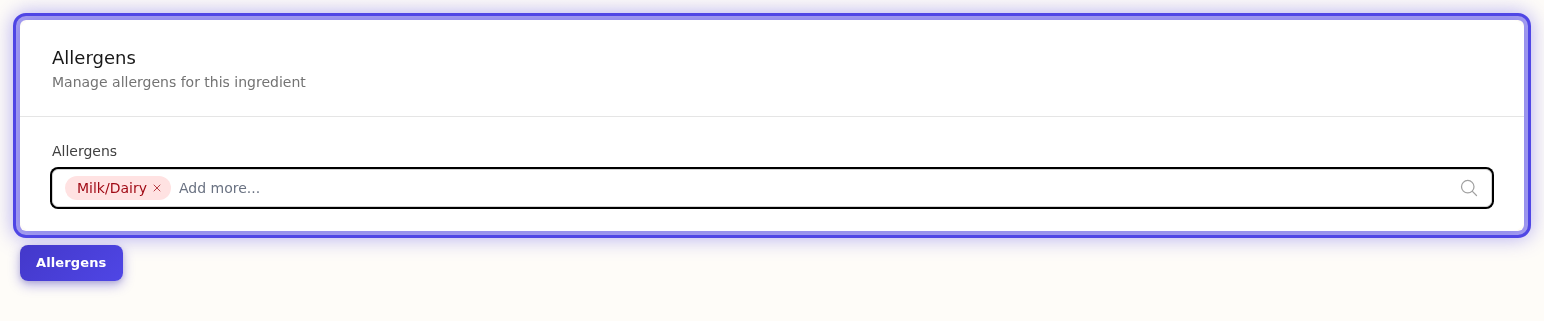
- Open an ingredient
- Go to the Allergens section
- Click Add Allergen
- Select the allergen from the list
- Choose the Presence Type (Definite, Potential, or Traces)
- Add Notes if needed (optional)
- Click Save
Quick Add
Use the allergen selector to quickly tag multiple allergens:
- Click in the allergen search field
- Type to filter allergens
- Click to add each one
- Adjust presence types as needed
Allergens in Recipes
Automatic Aggregation
When you add ingredients to a recipe, allergens appear automatically:
Recipe: Chocolate Chip Cookies
├── All-purpose flour → Wheat
├── Butter → Dairy
├── Eggs → Eggs
├── Chocolate chips → Dairy (potential)
└── Aggregated: Wheat, Dairy, Eggs
Viewing Allergens
On any recipe page, the Allergens section shows:
- Definite allergens — Red badges
- Potential allergens — Orange badges
- Traces — Yellow badges
Hover over any allergen to see which ingredients contain it.
Prep Recipe Allergens
When you use a prep recipe as an ingredient, its allergens flow through:
Prep Recipe: Pizza Dough
├── Contains: Wheat, Dairy

Recipe: Margherita Pizza
├── Pizza Dough (prep) → Wheat, Dairy (from prep)
├── Tomatoes → (none)
├── Mozzarella → Dairy
└── Aggregated: Wheat, Dairy
Custom Allergens
Need to track allergens beyond the standard list?
Creating Custom Allergens
- Go to Settings → Allergens
- Click New Allergen
- Enter the Name (e.g., "Corn")
- Add a Description (optional)
- Select an Icon (optional)
- Click Create
Custom allergens work just like built-in allergens.
When to Use Custom Allergens
- Regional allergens not in the standard list
- Customer-specific dietary restrictions
- Specialty ingredients (e.g., specific seed allergies)
Allergen Warnings
In Recipes
Recipe pages display allergen warnings prominently. The warning shows:
- All allergens present (by type)
- Source ingredients for each allergen
In PDFs
When you export or print recipes, allergen warnings appear:
⚠️ Allergen Warning
This recipe contains: Wheat, Dairy, Eggs
On Menus
Menu items inherit allergens from their linked recipes. Display options include:
- Allergen badges next to items
- Full allergen legend
- Grouped by presence type
Managing Allergens Across Your Database
Bulk Review
To review allergen coverage:
- Go to Ingredients
- Filter by Has Allergens or No Allergens
- Review and update as needed
Finding Missing Allergens
Ingredients without allergens may need review:
- Filter for ingredients with no allergens
- Check if they should have allergens assigned
- Common items to check: flours, dairy products, nut-based items
Regulatory Compliance
FDA Requirements (US)
The FDA requires declaration of the 9 major allergens on food labels. PrepStation tracks all 9 plus additional allergens.
EU Requirements
The EU requires declaration of 14 allergen categories. PrepStation tracks all 14.
Regional Filtering
Filter allergens by regulation:
- Go to Settings → Allergens
- Filter by FDA Required or EU Required
- Focus on allergens relevant to your region
Best Practices
Be Thorough
- Tag all known allergens on ingredients
- Include potential and trace allergens when relevant
- Review supplier documentation for allergen info
Keep Updated
- Update allergen info when suppliers change
- Review new ingredients carefully
- Check prep recipe allergens when modifying
Document Uncertainty
- Use "Potential" when unsure
- Add notes explaining the uncertainty
- Update when you get confirmed information
Common Questions
Q: Do I need to tag allergens on every ingredient?
A: Only tag allergens that are present. Ingredients without allergens don't need any tags.
Q: What if an ingredient has multiple allergens?
A: Add each allergen separately. An ingredient can have as many allergens as needed.
Q: How do I remove an allergen from a recipe?
A: Allergens come from ingredients. Remove the allergen from the ingredient, or remove/substitute the ingredient in the recipe.
Q: Are allergens updated automatically when I change ingredients?
A: Yes! Recipe allergens recalculate whenever you modify ingredients or their allergen tags.
Q: Can I export allergen information?
A: Yes, allergen info is included in recipe PDFs and can be displayed on menus.
Q: What about cross-contact during cooking?
A: Use "Potential" or "Traces" presence types to indicate cross-contact risks during preparation.
Next Steps
- Managing Ingredients — Set up your ingredient database
- Ingredient Library — Import ingredients with allergens pre-tagged
- Recipe Options — View allergens in recipes
- Building Menus — Display allergens on menus
Last updated: October 09, 2026