Vendor Costs
Ingredient costs come from your vendors. Link vendor products to ingredients to enable accurate recipe costing.
Overview
PrepStation uses a vendor-based costing approach:
Vendor Item (Product + Price) → Ingredient → Recipe Cost
This means:
- Ingredients don't have a "cost" field you edit directly
- Costs come from vendor products linked to the ingredient
- One ingredient can have multiple vendors with different prices
- The preferred vendor determines the cost used in recipes
Why Vendor-Based Costing?
| Benefit | How It Helps |
|---|---|
| Accuracy | Costs match actual invoices |
| History | Track price changes over time |
| Comparison | Compare vendors easily |
| Auto-update | Invoice processing updates prices |
Adding Your First Vendor to an Ingredient
Until an ingredient has a vendor with pricing, it shows no cost and recipes can't calculate accurately.
From the Ingredient Page
- Open the ingredient
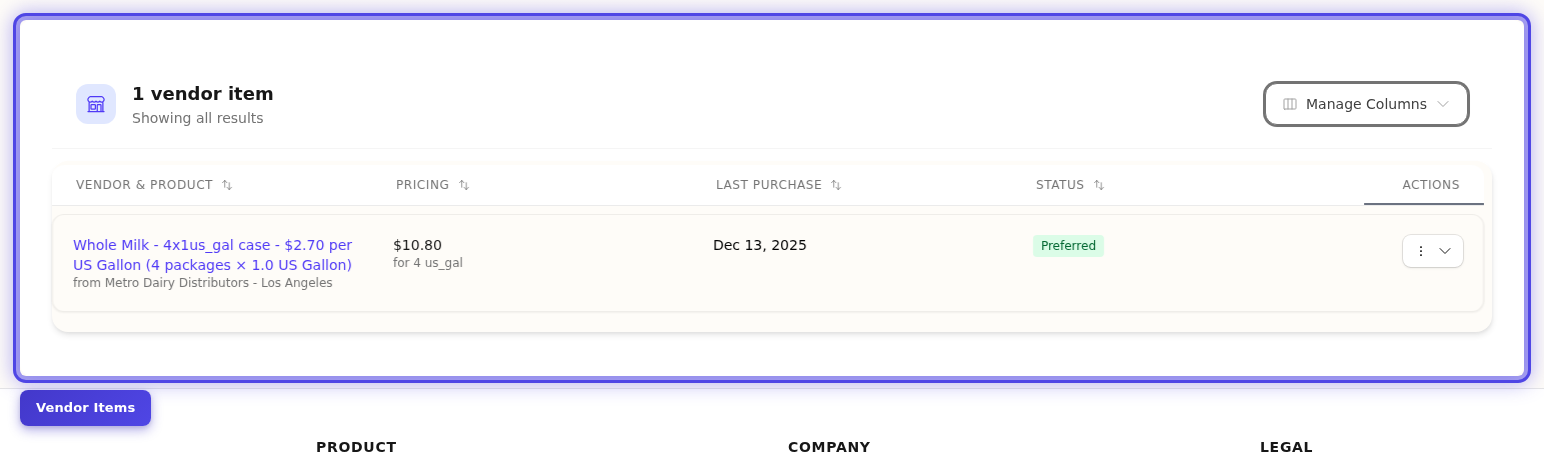
- Scroll to the Vendors section
- Click Add Vendor
- Fill in the vendor item details:
| Field | What to Enter |
|---|---|
| Vendor | Select from your vendor list |
| Item Name | Vendor's product name |
| SKU | Vendor's item code (for invoice matching) |
| Purchase Cost | Price per package |
| Package Quantity | How many packages (usually 1) |
| Package Unit | Package type (bag, case, box, etc.) |
| Content Quantity | Amount in the package |
| Content Unit | Unit type (lb, oz, each, etc.) |
- Click Save
Tip
The first vendor you add is automatically set as preferred, so your ingredient immediately gets a cost.
Example: Adding Flour Pricing
For a 50lb bag of flour at $24.99:
| Field | Value |
|---|---|
| Vendor | Sysco |
| Item Name | All Purpose Flour 50lb |
| SKU | 1234567 |
| Purchase Cost | $24.99 |
| Package Quantity | 1 |
| Package Unit | bag |
| Content Quantity | 50 |
| Content Unit | lb |
Result: Cost per lb = $24.99 ÷ 50 = $0.50/lb
Understanding the Cost Calculation
PrepStation calculates the cost per unit from your vendor pricing:
Cost per unit = Purchase Cost ÷ (Package Qty × Content Qty)
Example Calculations
Simple Package:
$24.99 for 1 × 50lb bag
= $24.99 ÷ 50
= $0.50 per lb
Case of Cans:
$36.00 for a case of 6 × 28oz cans
= $36.00 ÷ (6 × 28)
= $36.00 ÷ 168
= $0.21 per oz
Bulk Oil:
$89.00 for 1 × 5 gallon container
= $89.00 ÷ 5
= $17.80 per gallon
Adding Multiple Vendors
You can buy the same ingredient from different suppliers:
- Open the ingredient
- In the Vendors section, click Add Vendor
- Add the second vendor's details
- Repeat for additional vendors
The vendor list shows all options with unit costs for comparison:
| Vendor | Package | Price | Unit Cost |
|---|---|---|---|
| ★ Sysco | 50lb bag | $24.99 | $0.50/lb |
| US Foods | 25lb bag | $13.50 | $0.54/lb |
| Rest. Depot | 50lb bag | $22.99 | $0.46/lb |
★ indicates the preferred vendor used for costing.
Setting the Preferred Vendor
The preferred vendor determines which price is used in recipes.
To Change the Preferred Vendor
- Find the vendor in the list
- Click the star icon (★) next to it
- That vendor becomes preferred
- All recipes using this ingredient recalculate
Important
Changing the preferred vendor immediately updates all recipe costs. This is by design—your costs should always reflect your current supplier.
When to Change
| Scenario | Action |
|---|---|
| Found a better price | Switch to lower-cost vendor |
| Quality issues | Switch to reliable vendor |
| Vendor unavailable | Switch to backup vendor |
| New vendor added | Evaluate if they should be preferred |
See Preferred Vendors for more details.
Keeping Costs Current
Method 1: Process Invoices (Recommended)
When you process invoices:
- Prices on vendor items update automatically
- Cost history is recorded
- All recipes recalculate
This is the most accurate and lowest-effort approach.
Method 2: Edit Vendor Items
For manual price updates:
- Open the ingredient
- Click a vendor item to edit
- Update the Purchase Cost
- Save
Method 3: Import Price Updates
For bulk updates, import a spreadsheet with new prices.
Viewing Cost History
Track how prices change over time:
- Open the ingredient
- Scroll to Cost History
- View the chart and price timeline
Cost history shows:
- Price changes from processed invoices
- Date of each change
- Vendor for each price point
Troubleshooting Missing Costs
"No cost" or "$0.00" on an Ingredient
Cause: No preferred vendor set, or vendor item missing required fields.
Fix:
- Open the ingredient
- Check the Vendors section
- Either:
- Add a vendor item with complete pricing, OR
- Set an existing vendor as preferred
Required Fields for Costing
For costs to calculate, vendor items need:
| Field | Must Have |
|---|---|
| Purchase Cost | A price greater than $0 |
| Content Quantity | Amount in the package |
| Content Unit | Unit type (lb, oz, each, etc.) |
| Preferred status | One vendor must be preferred |
Recipe Shows "Missing Cost"
Check that:
- The ingredient exists (not archived)
- The ingredient has a preferred vendor
- The vendor item has complete pricing
Common Questions
Q: Why can't I just enter a cost on the ingredient?
A: The vendor-based approach ensures your costs match reality. Invoice prices update automatically, and you can track price changes over time.
Q: What if I don't know which vendor I'll buy from?
A: Add your most likely vendor with estimated pricing. You can always change it later, and invoice processing will update to actual prices.
Q: Can I see costs from a different vendor without changing preferred?
A: Yes. View the vendor list to see all unit costs. Only changing the preferred actually updates recipe costs.
Q: How do I handle price fluctuations (like produce)?
A: Process invoices regularly. Each invoice updates the price, and cost history shows the variation over time.
Q: What if the same product comes in different sizes?
A: Add separate vendor items for each size. For example, "Flour 50lb" and "Flour 25lb" as different vendor items from the same vendor.
Q: Do I need vendors for ingredients I already have in stock?
A: For accurate recipe costing, yes. Even if you're not ordering right now, the ingredient needs pricing to calculate recipe costs.
Next Steps
- Vendor Items — Detailed vendor item setup
- Preferred Vendors — Managing preferred selection
- Invoice Scanning — Auto-update prices from invoices
- Resolving Cost Issues — Fix recipe costing problems
Last updated: October 09, 2026