Vendor Items
Vendor items are the specific products each vendor sells. Link them to your ingredients to track pricing and enable cost calculations.
What Is a Vendor Item?
A vendor item represents one product from one vendor:
| Vendor Item | Linked Ingredient |
|---|---|
| Sysco All Purpose Flour 50lb Bag | All Purpose Flour |
| US Foods AP Flour 25lb | All Purpose Flour |
| Restaurant Depot Extra Virgin Olive Oil 1gal | Extra Virgin Olive Oil |
Each vendor item has:
- Product name — How the vendor calls it
- SKU — Vendor's item code
- Pricing — What you pay
- Packaging — Package size and contents
Adding Vendor Items
From an Ingredient
- Open an ingredient
- Scroll to Vendors section
- Click Add Vendor
- Select the vendor
- Enter product details
- Click Save
From a Vendor
- Open a vendor
- Click Add Item
- Search for and select the ingredient
- Enter product details
- Click Save
From Invoice Processing
When you process an invoice with new items:
- Match the item to an ingredient
- The vendor item is created automatically
- Future invoices auto-match using the SKU
Vendor Item Fields
Product Identification
| Field | Description | Example |
|---|---|---|
| Item Name | Vendor's product name | "All Purpose Flour 50lb" |
| Vendor SKU | Vendor's item code | "1234567" |
| Notes | Additional information | "Unbleached, organic" |
Pricing
| Field | Description | Example |
|---|---|---|
| Purchase Cost | Price per package | $24.99 |
| Package Quantity | Units per package | 1 |
| Package Unit | Package unit type | bag |
| Content Quantity | Amount in package | 50 |
| Content Unit | Content unit type | lb |
Example: Understanding Packaging
For a 50lb bag of flour at $24.99:
Purchase Cost:     $24.99
Package Quantity:  1 bag
Content Quantity:  50 lb
─────────────────────────
Cost per lb:       $0.50
Ordering Settings
| Field | Description |
|---|---|
| Minimum Order Quantity | Minimum you must order |
| Lead Time Days | Override vendor's default lead time |
| Default Storage Location | Where to store when received |
Status
| Field | Description |
|---|---|
| Active | Currently available for ordering |
| Preferred | Used for ingredient cost calculation |
Catch Weight Items
Some products are priced by weight but counted by piece:
Example: Chicken breasts
- Ordered by the case (6 pieces)
- Priced by the pound
- Each case weighs approximately 15 lbs
For catch weight items:
| Field | Value |
|---|---|
| Catch Weight | Enabled |
| Estimated Weight per Unit | 2.5 lb (per piece) |
This helps estimate costs before you know the exact weight.
Viewing Vendor Items
Vendor cards show the number of ingredients each vendor supplies:
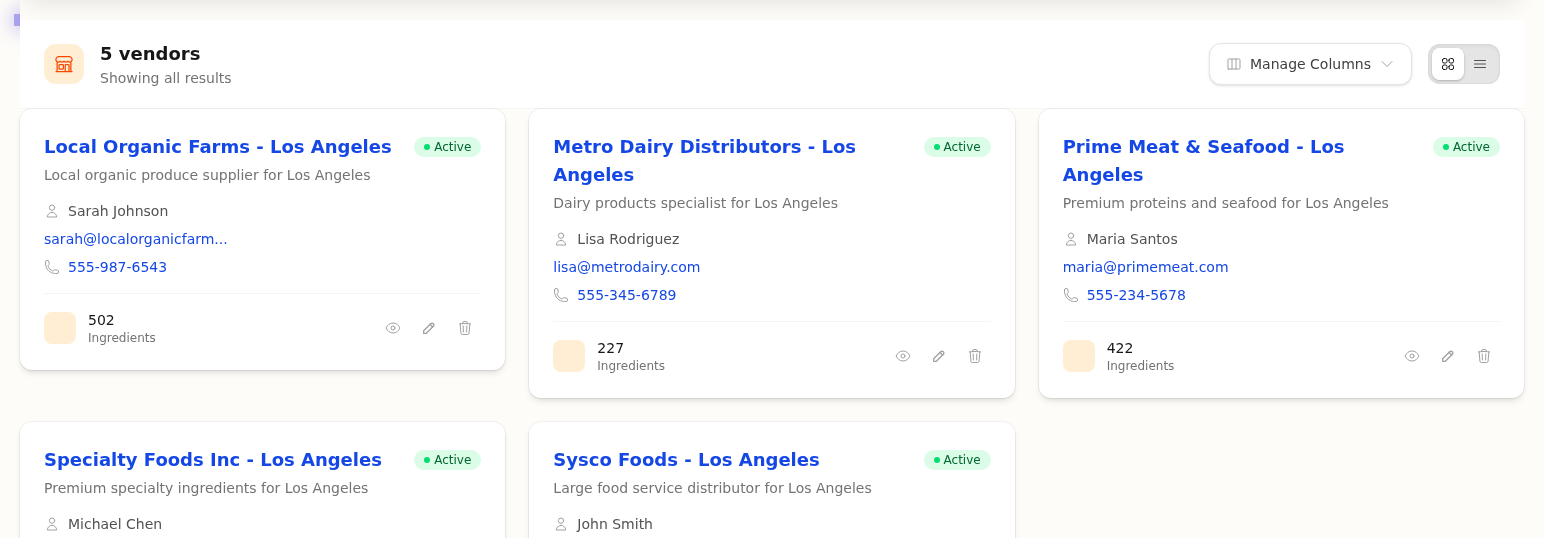
View ingredients from a vendor:
On an Ingredient
The ingredient page shows all vendors supplying that item:
┌─────────────────────────────────────────────────────┐
│ All Purpose Flour                                   │
├─────────────────────────────────────────────────────┤
│ VENDORS                                             │
│                                                     │
│ ★ Sysco          50lb bag    $24.99    $0.50/lb    │
│   US Foods       25lb bag    $13.50    $0.54/lb    │
│   Rest. Depot    50lb bag    $22.99    $0.46/lb    │
│                                                     │
│ ★ = Preferred vendor                                │
└─────────────────────────────────────────────────────┘
On a Vendor
The vendor page shows all items from that supplier:
┌─────────────────────────────────────────────────────┐
│ Sysco                                               │
├─────────────────────────────────────────────────────┤
│ ITEMS SUPPLIED                                      │
│                                                     │
│ All Purpose Flour     50lb    $24.99    ★ Preferred │
│ Kosher Salt          3lb     $12.50                │
│ Olive Oil            1gal    $45.00    ★ Preferred │
└─────────────────────────────────────────────────────┘
Editing Vendor Items
- Find the vendor item (from ingredient or vendor page)
- Click to open
- Update fields
- Click Save
Updating Prices
When prices change:
| Method | When to Use |
|---|---|
| Process an invoice | Prices update automatically |
| Edit vendor item | Manual price updates |
| Import prices | Bulk updates from spreadsheet |
Tip
Processing invoices is the most accurate way to keep prices current—no manual entry needed.
Orphaned Vendor Items
Sometimes you have vendor items not linked to an ingredient:
- Created during invoice processing before the ingredient existed
- Imported without ingredient match
- Items you don't track as ingredients (supplies, equipment)
Linking Orphaned Items
- Open the vendor item
- Click Link to Ingredient
- Search for and select the ingredient
- Click Save
Deactivating Vendor Items
No longer ordering a product from this vendor?
- Open the vendor item
- Click Deactivate
- The item won't appear in ordering but history is preserved
To reactivate: Open the item and click Activate
Common Questions
Q: Can one ingredient have items from multiple vendors?
A: Yes. Add as many vendor items as you have suppliers. Set one as preferred for costing.
Q: What if the same product comes in different sizes?
A: Create separate vendor items for each size (50lb bag vs 25lb bag).
Q: How do I compare vendor prices?
A: View the ingredient's vendor list—it shows unit cost for easy comparison.
Q: What happens to cost history when I change prices?
A: Each price change is recorded. You can view price history on the ingredient.
Next Steps
- Preferred Vendors — Set which vendor's price to use
- Invoice Scanning — Auto-update prices from invoices
- Managing Ingredients — Ingredient setup
Last updated: October 09, 2026